
How to block porn on a laptop: Windows, MacBook and Chromebook
To block porn on a laptop, add Escape for Chrome to the browser you use. It is free, has no account, and blocks 40,000+ adult sites in Chrome, Edge or Brave on any laptop, whether that is a Windows laptop, a MacBook or a Chromebook. On a MacBook that uses Safari, the free Escape app blocks the same list there. Set up each browser you use, and the whole laptop is covered in a few minutes.
Which one do you need?
| Your laptop and browser | What to use |
|---|---|
| Windows laptop with Chrome, Edge or Brave | Escape for Chrome. See the Windows guide. |
| MacBook with Chrome, Edge or Brave | Escape for Chrome. See the Chrome on Mac guide. |
| MacBook with Safari | The Escape app, free in Safari. See Escape for Mac. |
| Chromebook | Escape for Chrome. See the Chrome guide. |
Both use the same block list: 40,000+ adult sites, plus every address ending in .xxx, .porn, .adult and .sex. A site that is blocked in one is blocked in the other.
How to block porn in Chrome, Edge or Brave on a laptop
- Open the browser you actually use. Chrome, Edge or Brave.
- Add Escape for Chrome from the Chrome Web Store, where it is listed as Escape - Adult Content Blocker. In Chrome, click Add to Chrome, then Add extension. Edge and Brave install from the same store, and the Edge guide has the one extra setting Edge asks for.
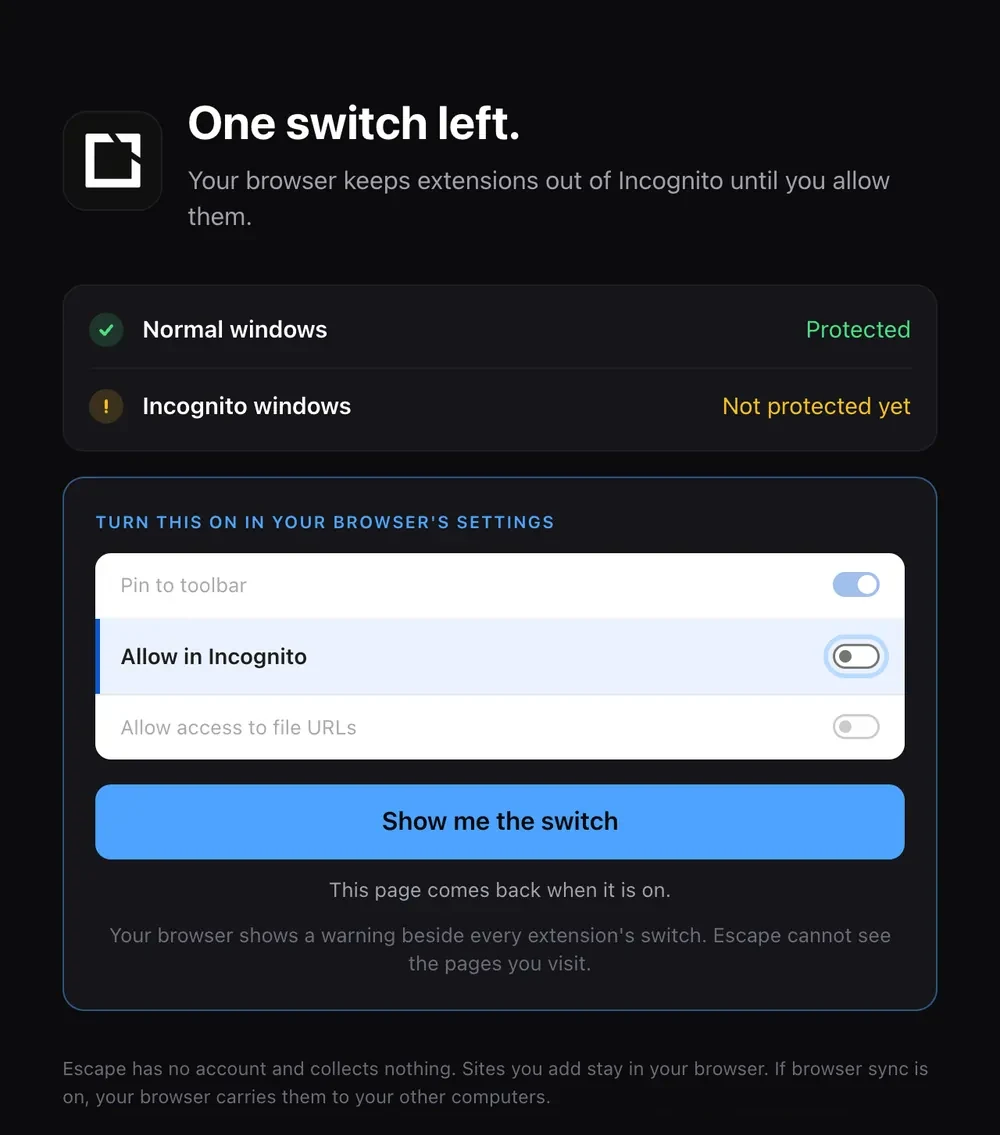
- Cover private windows. A setup page opens and walks you to the switch. In Chrome it is called Allow in Incognito, in Edge Allow in InPrivate, and in Brave Allow in Private. Turn it on, and the page says You are protected.
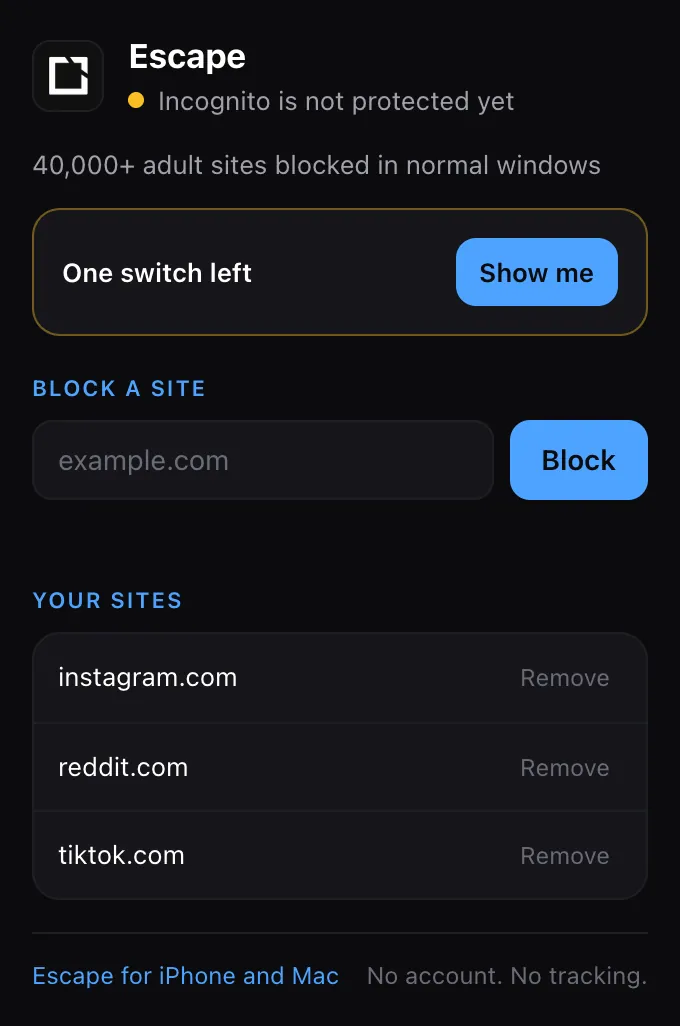
- Pin the Escape icon. Click the puzzle piece in the toolbar, then the pin next to Escape. From the icon you can add up to 200 sites of your own.
- Test it. Open a private window with Ctrl+Shift+N on Windows or a Chromebook, or Cmd+Shift+N on a Mac, and try a site you know is on the list. You should see the browser's plain page saying the site is blocked.
How to block porn in Safari on a MacBook
If you use Safari on your MacBook, install the free Escape app from the App Store. Turn on its blocker in Safari, and the same 40,000+ adult sites are blocked there. There is no account, and nothing leaves your Mac. The full Mac guide walks through it.
Many MacBooks have both Safari and Chrome. If yours does, use both: the app for Safari, and Escape for Chrome for Chrome.
Cover every browser on the laptop
Escape protects the browser it is added to, so add it to each browser you use. On a Windows laptop, Microsoft Edge stays installed even if you use Chrome, and some links from Windows open in Edge. So add Escape to Edge as well as your main browser. Each browser takes about a minute.
What you see when a site is blocked
Nothing loud. When you open a blocked site, the browser shows its own plain page saying the site is blocked. No pictures, no pop-ups, nothing that stands out if someone glances at your screen. You close the tab and carry on. That quiet pause can be all it takes for the moment to pass.
Block the other sites that pull you in
Not every site that drags you down is a porn site. Click the Escape icon, type or paste an address in the Block a site box, and click Block. The whole site is blocked, including its other addresses like www. and m. versions. You can add up to 200.
Private on every laptop
Escape for Chrome has no account and collects nothing. It cannot see the pages you visit or your history, and it sends nothing to us. The sites you add are kept by your browser. Here is what its two permissions mean.
Your phone counts too
A laptop is one screen. Cover your phone the same way. On iPhone, the free Escape app blocks the same list in Safari, and adds a streak, short lessons and urge tools. If you are just starting out, start here.
Common questions
How do I block porn on my laptop?
Add Escape for Chrome to the browser you use: Chrome, Edge or Brave. It is free, needs no account, and blocks 40,000+ adult sites straight away. Then turn on its private-window switch. On a MacBook that uses Safari, add the free Escape app, which blocks the same list in Safari.
Is there a free way to block porn on a laptop?
Yes. Escape for Chrome is free, with no account, no ads and nothing to buy. On a MacBook, the Escape app's Safari blocker is free too. Both block the same 40,000+ adult sites.
How do I block porn on a Windows laptop?
Add Escape for Chrome to Chrome, Edge or Brave on the laptop, and turn on its switch for private windows. Add it to Edge as well as your main browser, because Windows keeps Edge installed.
How do I block porn on a MacBook?
For Safari, install the free Escape app from the Mac App Store and turn on its Safari blocker. For Chrome, Edge or Brave on the MacBook, add Escape for Chrome. Use both if you use both kinds of browser.
Does it block porn in private windows on a laptop?
Yes, once you turn on one switch. Browsers keep extensions out of private windows until you allow them. Escape's setup page walks you to the switch, called Allow in Incognito in Chrome, Allow in InPrivate in Edge and Allow in Private in Brave.
Escape - Adult Content Blocker
Escape for Chrome blocks 40,000+ adult sites on any laptop. Free, with no account.
Free extension forChromeMore on this topic in Chrome and computer guides, or go deeper with the Your phone is the dealer course.