
How to block porn on your own computer, privately
To block porn on your own computer, add Escape for Chrome to your browser. It takes about a minute, it is free, and there is no account, no email and nothing sent to anyone. It blocks 40,000+ adult sites in Chrome, Edge or Brave, and one switch covers private windows too. It is built for an adult who wants porn off their own screen, for their own reasons.
Built for you, not for someone watching you
Escape does one job: the site does not load. There is no admin, no dashboard for someone else, no alert and no weekly summary sent anywhere. You set it up for yourself, and you decide what goes on your list. Wanting porn gone from your own computer is a good decision, and it is yours to make quietly.
Private from start to finish
- No account. No sign-up, no email, no name.
- Nothing collected. Escape cannot see the pages you visit, keeps no history and sends nothing to us.
- A quiet icon. The Escape icon only sits in your toolbar if you pin it. Otherwise it waits under the puzzle piece.
- A plain blocked page. When a site is blocked, the browser shows its own plain page saying so. Nothing else appears on screen.
Escape asks your browser for two permissions only, and neither one lets it read your pages. What those two permissions mean.
Set it up in a minute
- Add Escape for Chrome from the Chrome Web Store, where it is listed as Escape - Adult Content Blocker. Click Add to Chrome, then Add extension. Blocking starts straight away.
- Cover private windows. A short setup page opens. Click Show me the switch and turn on Allow in Incognito. In Edge it is called Allow in InPrivate, and in Brave Allow in Private.
- Check the page says You are protected. Both normal and private windows should show Protected.
- Test it. Open a private window and try a site you know is on the list. You should see the browser's plain page saying it is blocked.
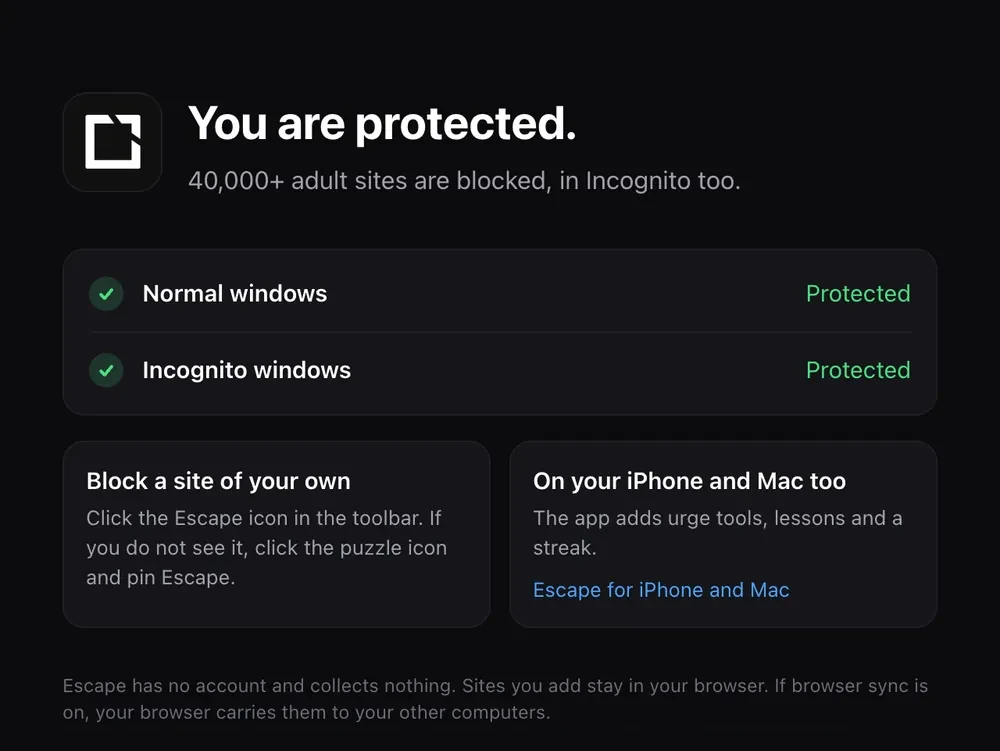
It works in Chrome on Windows, Mac and Chromebook, and you can add it to Microsoft Edge and Brave too. If you use more than one browser, add it to each. The full Chrome setup has every step in detail.
Why a block helps when you are the one choosing it
A slip often does not start with a big decision. They start with a tired evening, a bored minute and a browser that is one click away. A block puts a pause in that moment. The site does not load, the moment passes, and you get to choose again with a clearer head. That pause alone can make a real difference.
It also takes the decision off your shoulders. You made the choice once, on a good day, in about a minute. After that, the block holds the line for you on the harder days, so you do not have to win the same argument with yourself every evening.
A block works best as one part of a plan. If you are just starting, start here. And if keeping this to yourself matters to you, how to quit porn without anyone knowing covers the rest of a private plan.
Add the sites that pull you in
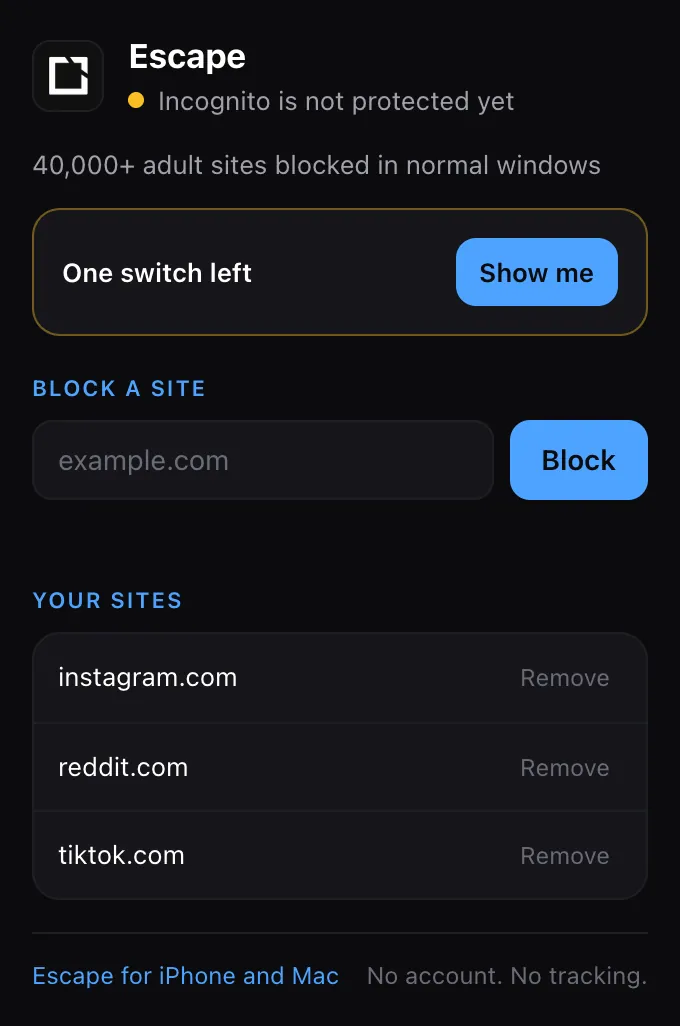
Your list is yours. Click the Escape icon, type or paste an address in the Block a site box, and click Block. The whole site is blocked, and you can add up to 200. A social feed you scroll late at night, a forum that leads somewhere you do not want to go: if it pulls you in, it can go on the list.
Cover your phone too
Your computer is one screen. Your phone is usually the other. On iPhone, the free Escape app blocks the same 40,000+ adult sites in Safari, also with no account. It adds a streak, short lessons and urge tools for the moments that need more than a block. Everything stays on your phone. With your computer and your phone both covered, the two screens you reach for most are quiet, and the choice you made today keeps working for you tomorrow.
Common questions
How can I block porn on my own computer?
Add Escape for Chrome to the browser you use: Chrome, Edge or Brave. It blocks 40,000+ adult sites straight away, free, with no account. Then turn on its private-window switch so Incognito is covered too. It takes about a minute.
Can I block porn for myself instead of using parental controls?
Yes. Escape for Chrome is made for an adult who wants porn off their own screen. There is no admin, no second person and no report to anyone. You set it up for yourself, and it simply blocks.
Will anyone know I installed a porn blocker?
No one is told. There is no account, no email and nothing sent to anyone. The Escape icon only sits in your toolbar if you pin it, and a blocked site shows the browser's own plain page.
Does it keep a record of what I tried to open?
No. Escape cannot see the pages you visit, keeps no history and sends nothing to us. The browser does the blocking from a list, and Escape never learns what was blocked.
Is it really free?
Yes. Escape for Chrome is free, with no ads and nothing to buy. The Escape app for iPhone, iPad and Mac is a separate download with a free Safari blocker and an optional Premium.

Escape - Adult Content Blocker
Block porn on your own computer in a minute. Free, no account, nobody told.
Free extension forChromeMore on this topic in Chrome and computer guides, or go deeper with the Your phone is the dealer course.